Hello all, for this last blog post of my class semester, I will discuss the results of my optimization tests on the Guetzli image compression program. In short I was successful in speeding up the image processing on both AArch and x86 64 bit processors. How did I do this? Well I must make a small confession:
I made a mistake in my initial bench marking test.
What was that? You could not hear? Ok well…
I made a mistake in my initial bench marking test. I configured the wrong make files.
Ehh you say you still could not hear me?… Sigh Weeeeelllll….
I MADE A MISTAKE IN MY INITIAL BENCH MARKING TEST. I CONFIGURED THE WRONG MAKE FILES!…
Yes that’s right I mistakenly configured the main make file when I should have been configuring the Guetzli.make file that the main one was referencing. After a quick change to from the default O3 optimization level, to the Ofast preset, I observed a processing time reduction of almost 1 minute for both architectures!
Well I guess job done, see you everyone, thanks for your time!
.
.
.
Ok ok I try to do a deeper dive into what’s was going. The optimization test were conducted on the AArch_64 machine named Archie, and the x86_64 machine Xerxes. Both were given an image to process that would result in more than three minutes of processing time, relative to what each machine could handle. Archie used the default bees.png image that comes with the source code distribution, and Xerxes used a 720p image with full background detail.



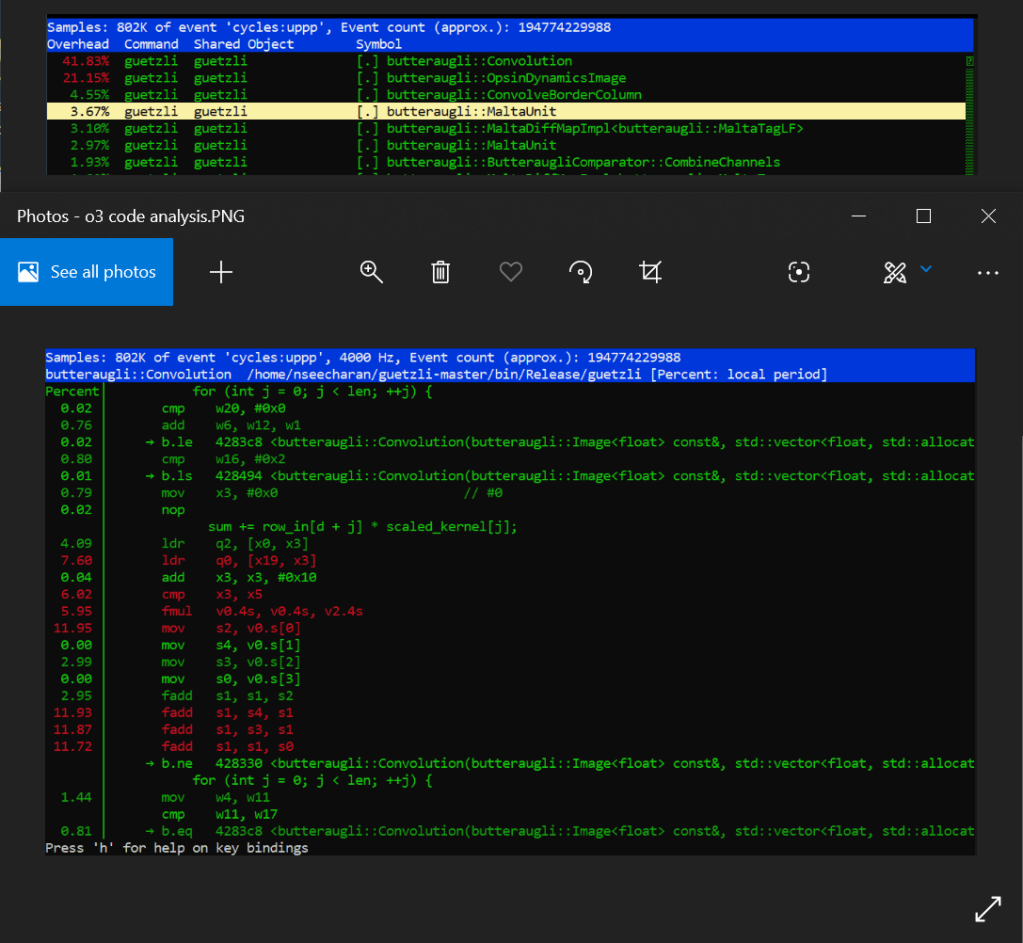
Now when I ran perf on each machine per test to see what was going on, and what I saw suggest a SIMD (Single Instruction Multiple Data) approach would likely be the best way to optimize the program.
Archie
Xerxes
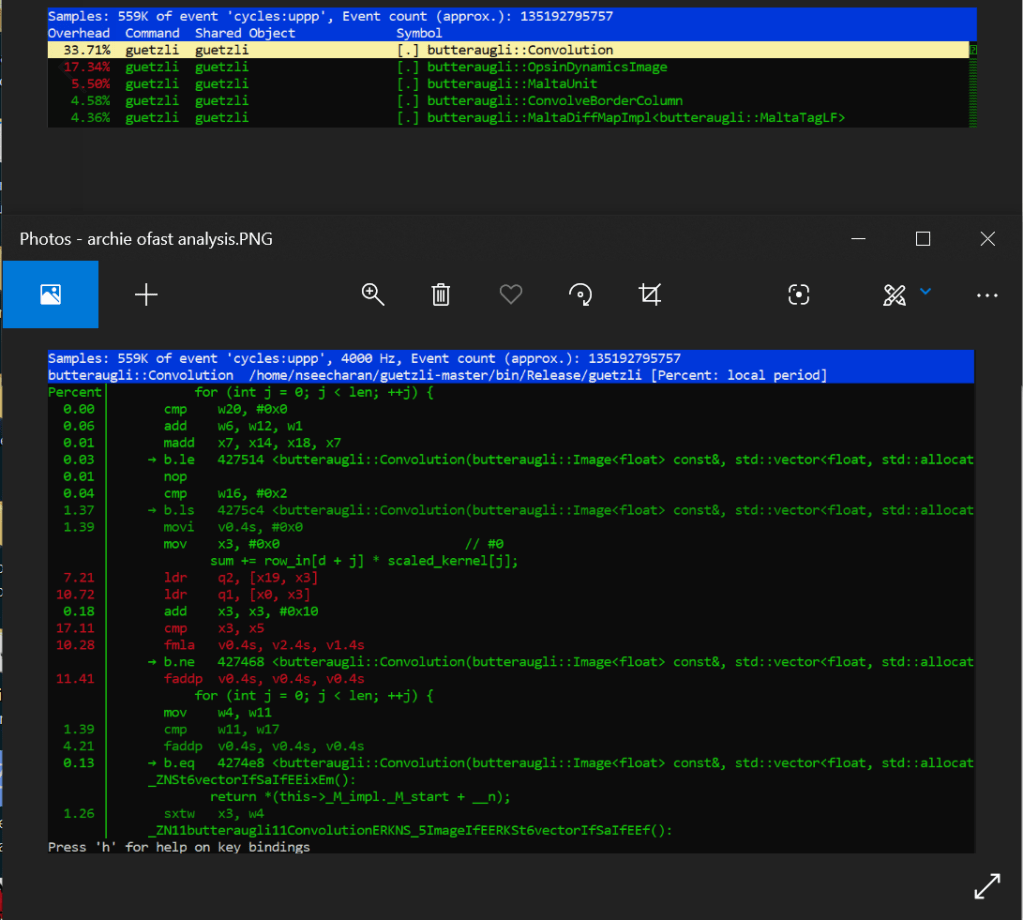
When looking at the perf report for Archie, we see that the default code is employing the use of a series of scalar fadd opcodes to handle the single precision floating point values from what appear to be an array of data. At the very least it’s incrementally adding and storing four separate values, into one final value, which are all loaded into memory with four related move opcodes. Why is this you ask? Well this is likely due to an image being made up of three color channels: Red, Green, Blue, as well as an Alpha channel for transparency, with each channel holding varying levels of “intensity” data; RGBA in short. This is why we see four values, adding to one other value to serve as the sum total. That in mind, when you combine these channels together you get a full color image, with the possibility of semi to full transparency. Now according to the arm documentation on the official website, fadd is part of the SIMD set of processor instructions. Further more, it appears that the four fadd opcodes are adding 32bit wide registers together (denoted with “s”). These observations are important to note, as it may suggest that the program is already optimized appropriately for it’s intended function. However more on that shortly.
Looking at the assembler code sequentially, you can really get a sense that it’s doing a lot of similar tasks one by one. Worse still is that when you combine the processing percentages together for three of the four fadd instructions, you get around 36% of a processing load for the conversion. Certainly this is not the most efficient way to do things*. If only you could make all this work happen in parallel…
Well after optimizing the code with the fast level, it turns out that we can with an add pairwise instruction called faddp (vector variant). To keep it simple, this takes a pool of data, and instead of adding everything sequentially, it breaks the data up into pairs, and adds them together until they all combine into one floating point value. This is extremely useful as it means the processor can store data in memory much faster, even if it is arranged somewhat differently. This speed increase is more evident as there is no longer a need to separate and store (move) the data before adding them all up soon after. This SIMD instruction will just break up the data logically, and store them all at once in a single address that can hold the the length of that data.
Now I have to make another confession. You may have notice that nice boded * two paragraphs ago. I did that because suggesting fadd is not an efficient implementation is a bit unfair. You see, pairwise operations can have a some errors when rounding off values, and if preserving as much detail as possible is your goal, then speed may not be the main focus here. This may be the reason why the developer used optimization level 3 instead of fast, as it relied on a slower but potentially more precise way of processing data.
Well it looks like this a done deal then! Yes, but I would be remiss if I did not at least mention why vadd was likely not used by the compiler. When building code into a piece of software, the compiler tries to translate it to assembler code, that is as efficient as the optimization level allows. In this case, we are only ever working with 32bit length values, so anything larger than that would just be a waste of memory, and overkill of an operation for the task at hand. That in mine, vadd would serve us better when working with data of longer bit lengths. Ok now that’s the final nail in the coffin! Now that much of the logic changes have been established, (not to mention I kind of already did an analysis of the assembler code in stage 2) I’ll try to keep the x86 test on the short side for everyone’s sake haha!
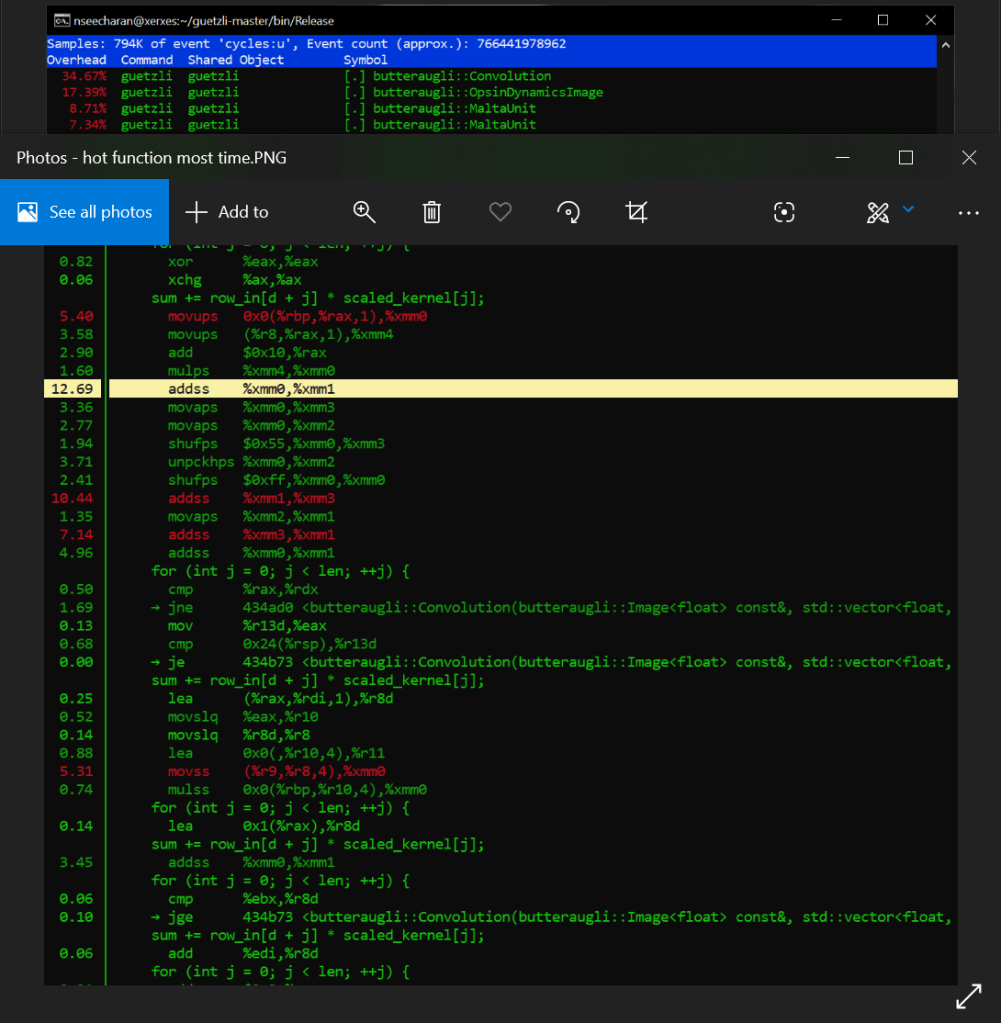
Ok so Xerxes, what are we seeing in the default optimization versus the fast setting for x86_64? Just like the AArch_64 test, there are a lot of similar processes happening one after the other, while also carrying out instruction to store the data in memory in an aligned manner via moveaps. We also see that it is using the unaligned variant moveups to store the two values that represent the “row_in” and scaled_kernel variables of the C++ code. This is of course is just an assumption, but it is based on the on the data we see the mulps opcode using (multiplication for floating point values). There is also shuffling (shufps) and unpacking (unpckhps) of the values just to make this += operation work.
That is quite a bit of work the processor is doing huh?
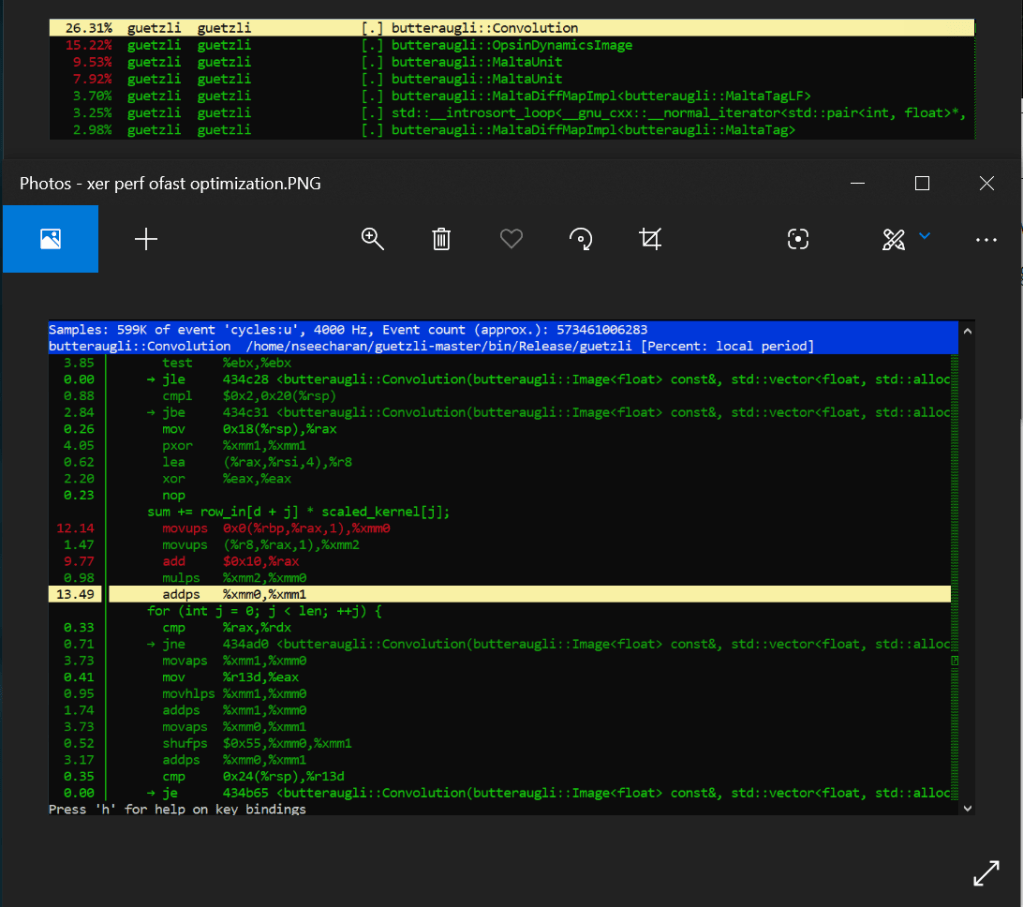
Well when we look at the fasts solution, we see that the addps SIMD opcode completely eliminates the need to store so many separate values into memory, only to just sum them up soon after. It can work with four packed floating point values which basically covers all four addss right there, basically eliminating more that 20% of processing load from just the adds alone! You also remove the need to do shuffling, unpacking and aligning data in memory. Therefore, significantly less instructions get carried out by the processor, which results in a much faster compression process.
Phew! We got through it and I manged to keep it short…ish. Before I put this thing to bed however, I think I need to mention this programs biggest rival in the form of mozjpeg. Mozilla simply knocked it out of the park here, prioritizing speed over pure accuracy, which to be hones, is not really all that noticeable to begin with unless you magnify the JPEG image by three hundred times. Only then will you see a smoothing effect, as opposed to Guetzli, which tries to replicate, if not preserve the natural noise of an image. Now while I think this is admirable, at the end of the day I tend to side with this bloggers assessment that when it comes to working with images, you want conversions to be quick and small. Now while I personally have not tested mozjpeg myself, I have converted my fair share of images to JPEG back when I was a visual effects artist. That in mind, I can honestly say that anything above a 30 seconds is far too much for the needs of the web, and end users alike. This is especially true when the differences in image quality are not all that perceivable by most people.
So what makes mozjpeg so darn fast?
Well for starters their code is written in C, and also makes use of a lot of assembler code for various processor architectures. Also their focus appears to be towards general purpose use, as oppose to trying to create some kind of lossless JPEG. Overall it extremely well optimized to work well on most machines, while guetzil is written in C++, uses only the O3 optimization, and essentially is a wrapper for the Butteraugli image analysis program developed by Google. In the end I suspect that this was just one of many AI related experiments from google, where some devs were probably trying to see if the Butteraugli algorithm could be used in other ways. Personally I think they should just work on a new image format than trying to reinvent the wheel. Who knows though? One day I may need to eat my own words, if in the end the program gets thoroughly optimize, or if budget computers end up being powerful enough to just brute force through this method of processing images.
Well that’s my two cents! Thank you for sticking with me through this process of optimization, and kind regards to my professor for steering me in the right direction when I had questions.
Bye for now!
 Nigels SPO Blog