Hello all, this week I was introduced to some of the opcodes (operation code) that power the 6502 processor. While there are around 50 of them, we were given some hands on experience with TYA, LSR, ASL, INY, LDA, LDX, LDY, STA, BNE, and CPX. I also took it upon myself to learn about the opcodes JSR and RTS, to help with completing one of the tasks that I was given. You can read more about these operations here if you feel so inclined (scroll down a bit for the list). Now what can you do with all of these things?
Well this!
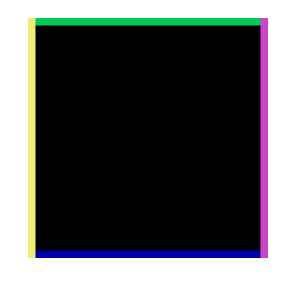
Truly remarkable!
While I will eventually explain how I created these four lines, I would first like to talk about some of the coding experiments that I conducted in class, using the example code that the professor had provided:
	lda #$00	; set a pointer at $40 to point to $0200
	sta $40
	lda #$02
	sta $41

	lda #$07	; colour

	ldy #$00	; set index to 0

loop:	sta ($40),y	; set pixel

	iny		; increment index
	bne loop	; continue until done the page

	inc $41		; increment the page
	ldx $41		; get the page
	cpx #$06	; compare with 6
	bne loop	; continue until done all pages
Example Code Breakdown
What your are seeing is code that fills the screen completely with the color yellow. It accomplishes this by storing a color value in memory, and progressively displays that color on screen, pixel by pixel until a certain point. You see, this processor divides the screen into four horizontal graphical sections, from top to bottom. Each section can hold only 256 pixels, so it is important to tell the processor to move on to the next one, when the current section is filled. That magic happens in the last seven lines of code, starting with the line labelled “loop:.” Essentially what is happening here, is that the processor is repeating the task of coloring 256 pixels yellow, four times.
Ok so that was a basic primer of what’s going on, now time to discuss the experiments I had to conduct.
1) What would happen if I typed TYA (Transfer the value in the Y register to the Accumulator) before the STA in the loop?
loop: tya
sta ($40),y ; set pixel
Well the value stored in the Y register has been programmed to count upwards by one. The Accumulator on the other hand stores two values at different memory locations: the color value at location memory location 40, and the graphical section at location 41. Now by calling TYA, before the sta, you are also telling the processor to replace the color value at location 40, with the increment value in the Y register. This cause the colors to change, however the 6502 can only display a maximum of 16 unique colors, to the sequence repeats twice for two sets of 16 colors per horizontal line. Once the screen is completely filled, it will look as though there are 32 multi colored vertical stripes on screen.
2) What effect does adding LSR (Logical Shift Right) after the TYA do?
loop: tya
lsr
sta ($40),y ; set pixel
LSR divides values by two, but because binary can only represent whole numbers, so anything to the right of the decimal simply gets discarded. This rounding effect causes color values to repeat twice in a row, which creates thicker vertical stripes. For example: if the 1 is white and 0 is black, but the 1 gets divided by 2, you would get 0.5. This however can not be represented in binary, so everything right of the decimal point gets dropped, and you are left with another 0 value. Therefore the pattern observed for one LSR is then 00,00,01,01,02,02,03,03… 15,15 per line.
Adding extar LSR operations will continue to double the pixel width of the colors, causing them to shift to the next line when they exceed the pixel width of the screen. Here is what including two LSR operations would look like:
00,00,00,00,01,01,01,01 … 07,07,07,07
08,08,08,08,09,09,09,09 … 15,15,15,15
3) What happens when you replace the LSR operations with ASL (Arithmetic Shift Left)?
loop: tya
asl
sta ($40),y ; set pixel
It does the opposite effect where the changing color value in the Accumulator gets multiplied exponentially per ASL added. For example, adding one ASL to the code, will display every other color as the value increments by multiples of 2. Adding two or three of these opcodes will result in showing colors at multiples of 4 and 8 respectively, and skipping the colors in between for each. Here’s what that would look like:
ASL
00,02,04,06,08,10,12,14,00,02,04,06,08,10,12,14
ASL
ASL
00,04,08,12,00,04,08,12,,00,04,08,12,00,04,08,12
4) Restore the code to it’s original version, and experiment with adding five INY (INcrement the value in the Y register) opcodes. What happened?
loop:
sta ($40),y ; set pixel
iny ; increment index
iny ; increment index
When extra INY opcodes were added, they would make the increment value bigger, and would display a yellow pixel per every “x” number of pixels. For example, using two INY opcodes would display a colored pixel for every two pixels.
That said, I noticed that “even” values created vertical stripes, while “odd” values filled the screen completely. When looking at the code executing at 1% of the processors speed, things begin to get clearer. When an odd number of INY are used, colored pixel are spaced out irregularly, and eventually shift to the next line unevenly. However, due to this irregular positioning, the graphical section never gets completed on the first pass, and will loop until the section is full before moving on. “Even” on the other hand, never misses the end of a graphical section, and therefore completes each section on their first pass.
5) Ok so what about those fancy borders you mentioned earlier, how did you do that?
While I am sure there are far more efficient ways to display different color lines around the borders of a screen, I decided to create a series of loops that would create each line, one after the other.
You can view the code here.
At the top of the code you can see that I have loaded values into two memory locations similar to the example code shown earlier. What I then do is create four loops, labelled after each color, and in each loop I load the appropriate color value, and increment the pixel position. This is accomplished by adding the growing Y value, to the one stored in memory location 40 of the accumulator. This is basically the same for all loops however in the case of the “green” loop, the CPY (ComPare Y) opcode is use to allow the processor to stop this operation when the Y value equals the first pixel position for the second horizontal line of the screen. It reaches the beginning of the second line and say “I’m done,” basically. Once out of the loop the code changes the value in the Y register to indicate where to begin drawing the line for the next loop, like in the case of “blue.” Instead of starting at position 00, we will start at the last line of the fourth graphical section (LDA#$06), with the pixel position e0.
To visualize this, this is how the first two horizontal line are represented:
00,01,02,03,04,05,06,07,08,09,0a,0b,0c,0d,0e,0f,10,11,12,13,14,15,16,17,18,19,1a,1b,1c,1d,1e,1f
20,21,22,23,24,25,26,27,28,29,2a,2b,2c,2d,2e,2f,30,31,32,33,34,35,36,37,38,39,3a,3b,3c,3d,3e,3f
this pattern continues all the way to the last line which starts at e0 and ends at ff. With the horizontal lines complete, we can then move on to the trickier vertical lines. The challenge here was to make it so that only the first pixel of each line, for each graphical section was colored. This required the looping structure of the example code where there was an inner and outer loop (refer to the “Example Code Breakdown section”). In addition, to make it start at the first pixel of each line, I needed to skip every 32 pixels after the first pixel was colored. While I used the opcode JSR (Jump Sub Routine) to reuse a code sequence written elsewhere, that sequence was essentially 32 entries of INY. It was crude but allowed me to skip the necessary 32 pixels. Purple was not that much different, however I had to change the starting pixel position to 1f (last pixel of line one), and then skip 32 pixels. This alone would create a problem however as the code would just loop back to 1f from the last pixel of the last line, and never switch to the next graphical section. To fix this I had the code compare when it loops back to 1f so that it could end the procedure and switch to the next section.
All in all it was a fun learning experience.
Well thank you for reading this post, have a great day.
 Nigels SPO Blog